







From Basecamp to a Solo run
The original Cork7 page opened a Basecamp lobby in our desktop Chrome check on 31 October 2026. Solo was selected, with Locker, Leaderboard, Replays and Updates nearby. Pressing Ride opened a park map rather than immediately putting the skier on snow. Choose a park, check the selected mode and use Ride Solo.
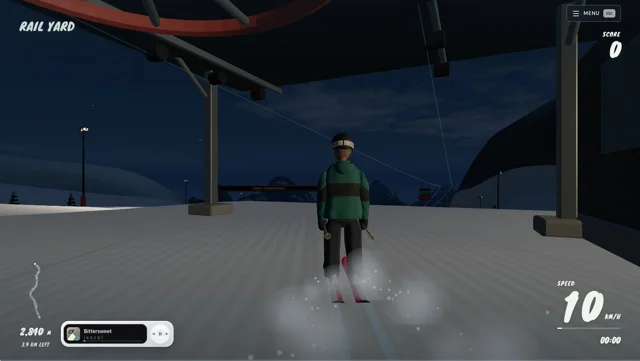
Our check selected The Yard and reached the rendered mountain after its loading screen. The gondola section offered Skip Ride; using it reached the Rail Yard scene with a score display, minimap, speed and run timer. This verifies the opening route and scene, not every trick, online room or graphics device.
Choose the session before joining friends
The park selector separated Solo from Multiplayer. The Basecamp also exposed a ranked APEX mode, labelled Beta. Read the currently selected mode before starting: a single-player practice visit and a live room are different sessions. Sign-in prompts, ranks and any optional purchases belong to Cork7, not RadiantGames.
For a first visit, get comfortable with one park before treating the live rider count as a reason to join. Counts change, so this page does not advertise a fixed number of active players or promise an immediately available opponent.
The few controls to learn first
The original field guide describes A and D for carving and spinning, W for tucking or a frontflip, and S for braking or a backflip. Hold and release Space to prepare and pop a jump. Q and E are grab controls; F skips the gondola, while Escape or P opens the menu. Read Settings → Controls for the actual bindings and controller setup.
Try a simple takeoff and controlled landing before combining rotation and grabs. An input legend describes what a key does; it does not guarantee a completed trick. The game judges the movement you finish.
Parks, replays and coming back to a run
The checked map exposed several different parks, including The Yard, Apex and a powder area. The lobby also offered a dedicated Replays destination. Those are useful reasons to return to the original game after a short practice session, rather than treating each visit as an unrelated new game.
A RadiantGames heart stores this page address. It is not a Cork7 replay, account or cloud-save transfer. Read the original Privacy and saves information before clearing its site data or moving browsers, and use the original game’s own replay controls for a run you want to keep.
Browser requirements, phones and fullscreen
The author’s guide recommends an updated, hardware-accelerated browser with WebGL 2. It describes touch and controller options, but our completed startup check was on desktop Chrome. We have not certified a full run on every physical phone or a native mobile fullscreen API. Check the whole control area and performance on your device before a long session.
If the scene is still downloading, watch for progress instead of repeatedly opening new copies. A loaded page, a loading bar and the rendered mountain are distinct states; this directory does not report them all as a successful play session.
Why the picture opens the original site
Cork7’s current server sends X-Frame-Options: SAMEORIGIN. Embedding that page here would therefore fail in supported browsers. The picture opens cork7.com in a new tab and keeps this guide available for your return. We do not bypass its embedding restriction or copy its commercial assets to our storage.
For another session inside RadiantGames, choose one of the related pictures. Recommendations prioritise available in-page games and your device’s controls. Cork7 remains an independent game; this page is maintained by Owen Carter, the operator of RadiantGames, and is not an official Cork7 publication.