
Use fullscreen on the tab where the game actually runs
Open Azeroth Survivors on the creator’s original site, keep that tab selected and use your browser’s full-screen command. In desktop Chrome, open the browser menu and use its full-screen control; the usual shortcut is F11 on Windows/Linux or Control–Command–F on macOS. Laptop function-key behaviour can vary.
RadiantGames currently opens this game on the creator’s site. Enlarging a different player on RadiantGames cannot enlarge the original tab. Keep the help page open separately so returning to an instruction does not replace a loading game.
Browser fullscreen, UI scale and render scale do different things
| Control | What to use it for | What it does not prove |
|---|---|---|
| Browser fullscreen | Give the selected tab more of the display | Touch controls or game compatibility |
| Graphics → UI Scale | Adjust the size of the game interface | More physical screen space |
| Graphics → Render Scale | Adjust rendering resolution | A missing menu or failed download is fixed |
| Full Screen Glow | A graphics effect in the inspected options | Entering browser fullscreen |
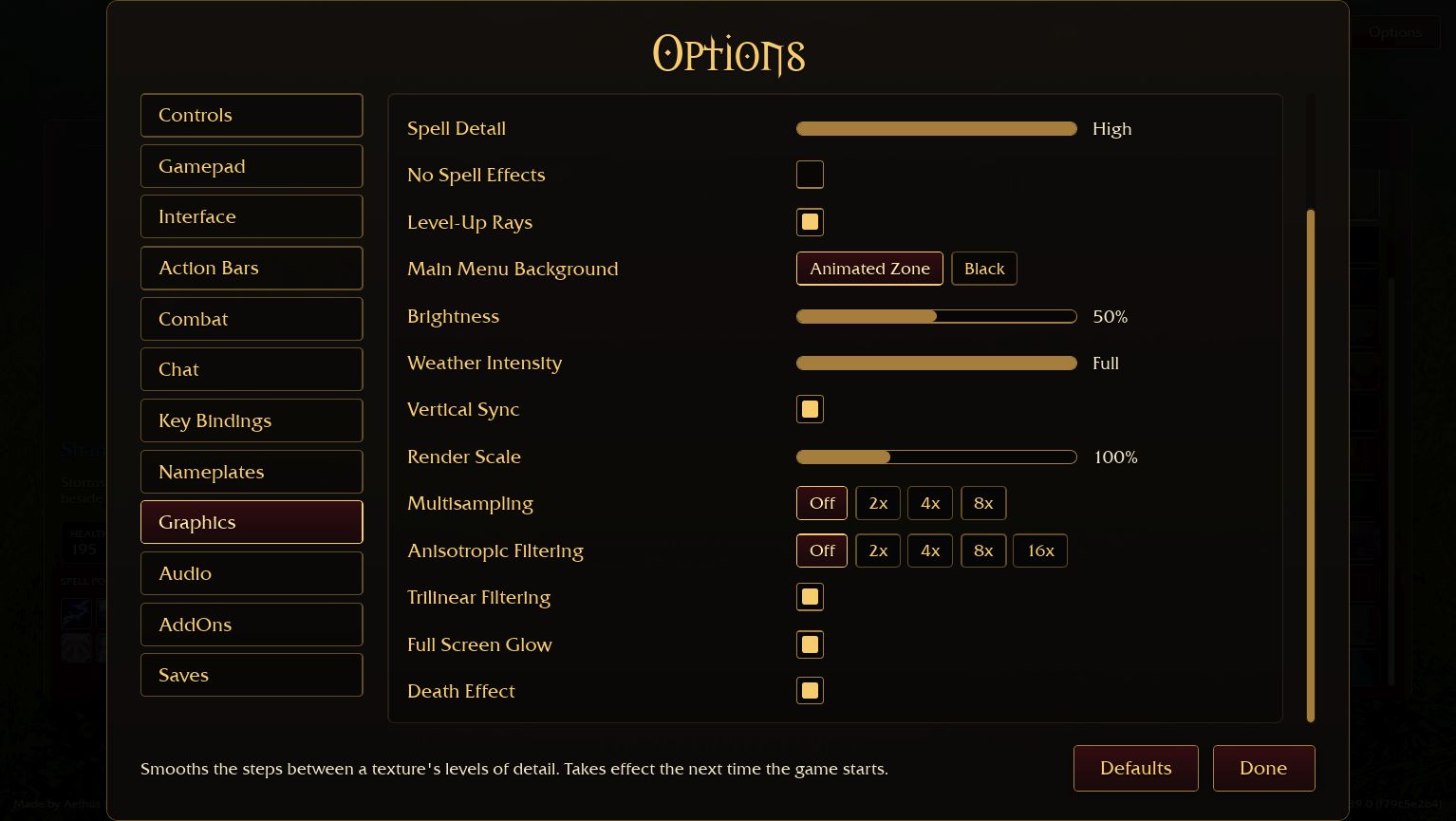
In the original v0.139.0 Graphics menu, UI Scale appears near the top and Full Screen Glow appears lower in the scrolled list. The latter is not a fullscreen switch. Read the label before changing a setting; keep the previous value so a visual adjustment is easy to undo.
On a phone, check the whole menu before starting
Rotate to landscape and wait for the original page to resize before tapping a small menu control. Fullscreen support differs by mobile browser; hiding browser chrome or adding a site to the home screen is not the same as a successful Fullscreen API request. A desktop browser resized to 390 pixels does not certify a physical phone.
Confirm that class choices, the entry button and essential controls fit at the same time. If the graphics requirement prevents loading, fullscreen will not provide the missing WebGPU adapter. Keep the current tab and use the download and browser help to choose a compatible route instead of repeatedly restarting the load.
Click the right tab and leave yourself a way back
If a key changes the page or a field instead of the view, stop and use the browser menu. The game is a canvas application and can have an active text entry; a typed letter is not evidence that a browser shortcut succeeded. Keep browser zoom separate from game UI scale, and restore an accidental zoom change before diagnosing clipped controls.
If a full-screen attempt fails, return to an ordinary maximised browser window and compare the same original tab. Do not clear website data to solve a viewing problem: that can affect local progress. Export through Options → Saves before moving to another browser or a downloaded client.
Change the view without turning it into another download
A loaded game menu and a playable run are different checkpoints. Allow a progressing resource counter to finish before judging the view. A black screen with no working graphics adapter needs a compatibility check, not repeated full-screen toggles.
When ready, keep the original game open and use the Shaman guide or ASBuilder planning guide in another tab. Favourites on RadiantGames save a page link; they do not preserve the original game’s current screen, equipment or save.
Primary sources: Aethus’s original game and live menus · Chrome viewing and zoom help