The browser now has its own AddOns installer
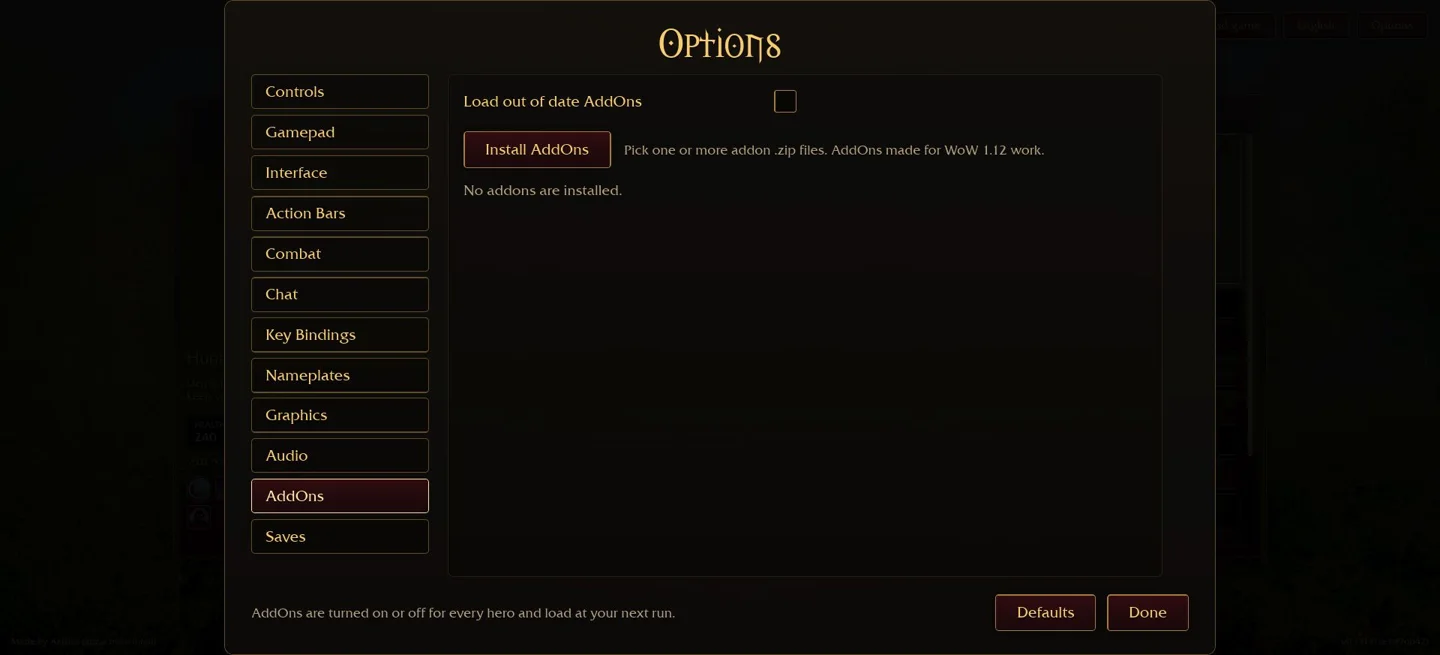
In the original browser game, open Options → AddOns. The v0.131.0 menu checked on 31 October 2026 offers Install AddOns and says to pick one or more addon .zip files. It also states that addons made for WoW 1.12 work. This is an interface compatibility statement, not a guarantee that every old package or download is safe or suitable.
A Windows instruction telling you to open a local AddOns folder is not the same workflow as this browser ZIP picker. Start with the menu in the environment where you actually play. We inspected it without installing a third-party package or changing a player’s save.
Check the built-in interface before adding another overlay
Options → Interface includes Damage Meter on Top and HUD Scale. The first is a placement option, not a claim that a new addon was installed; the second changes interface scale. Look at the original display and its available controls before installing a second overlay to solve a layout problem.
Damage per second, total damage and healing describe different things. A meter’s total depends on the duration and situation. Compare the same class, difficulty and equipment, and separate wave damage from boss performance. A large number alone does not demonstrate the best build.
Browser ZIP installation checklist
Get the package from its actual author, check that it targets Azeroth Survivors and read its release notes. Preserve a save backup first. In the browser, use the current Install AddOns control and select the intended ZIP. Confirm the addon is listed and enabled in the original menu rather than assuming a download installed it.
The checked menu says addons are enabled or disabled for every hero and load on the next run. If you remain at an old session, a missing overlay is not by itself proof of a failed import. Check the next-run boundary and enable state before repeatedly importing the same package.
One author-maintained example, not an endorsed download mirror
SurvivorsDragonUi is an author-maintained UI project with release ZIPs, layout controls and a combat meter. Its README also describes a Windows folder workflow. Read the author’s current release instructions and distinguish those from the browser ZIP menu shown above. We have not installed or security-audited that addon in this review.
RadiantGames does not mirror the ZIP, bundle an updater or ask you to run an extra executable. A UI addon executes code in its supported environment. Do not treat a file from a comment or an unrelated “DPS boost” button as the author’s release.
When an addon does not appear
Check the package name, target version and enabled state, then start the next run as the menu instructs. Keep the previous working setup available. The Load out of date AddOns option exists, but enabling it does not fix incompatibility or make unknown code safe. Do not turn it on merely to remove a warning.
If the interface becomes unusable, use the original AddOns list to disable the addition and follow the author’s troubleshooting instructions. Do not delete browser storage as a first fix: it may remove progress. See save export and restore before clearing anything.
Use a meter to answer a specific build question
Choose one question before comparing numbers: does the pet route clear clustered waves, does a boss phase take too long, or does a different spell route help completion? Keep the test conditions stable and record whether the run finished.
The Mage and Hunter guides list checked talent milestones. Their local checklists do not read original-game combat data. A third-party iframe loading in a directory also provides no trustworthy DPS or gameplay-duration signal.